Most SME "tech stacks" are archaeology — a layer of tools per initiative, each adopted enthusiastically and integrated never. This article is the reference architecture we use to prevent that: four layers, one deliberate choice per layer, and a build order that makes each layer amplify the previous one.
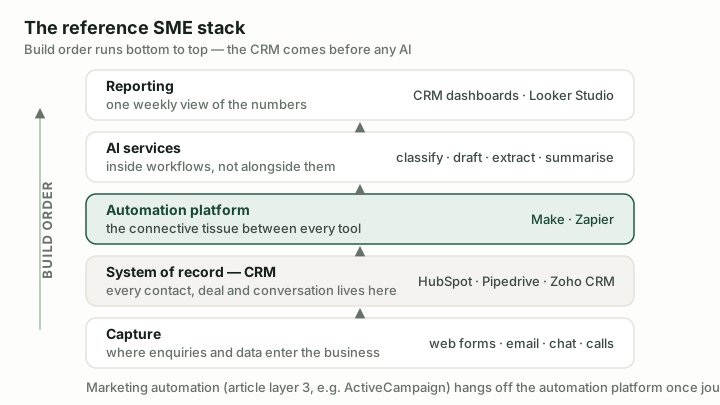
The reference stack. Build order runs bottom to top — the CRM comes before any AI.
Layer 1: The system of record (build first)
Everything else automates around whichever system holds your customer truth — so it comes first, and it is almost always a CRM. Our picks by situation are covered in the small-business CRM guide; the short version: HubSpot when marketing and service share the platform, Pipedrive for a focused sales team, Zoho CRM for value with configuration effort.
The architectural rule matters more than the pick: one system owns each fact. The CRM owns customers and deals; accounting owns invoices; the two synchronise. The moment two systems both claim to own a fact, every automation built on them inherits the ambiguity.
Layer 2: The automation platform (connective tissue)
One platform moves data between everything else: enquiry intake, CRM hygiene, document generation, notifications. Choose deliberately between Make (complex flows, better economics at volume) and Zapier (easiest self-service, widest connectors) — our full comparison covers the trade-off. What to avoid is accidental plurality: both platforms, adopted by different staff, running undocumented automations nobody owns. Pick one as the operational standard; permit the other only knowingly.
Two disciplines make this layer compound rather than rot: every automation gets an owner and an error route (silent failure is the killer), and automations get documented — a shared sheet listing trigger, purpose, owner is honestly sufficient at SME scale.
The open-source automation platform built for AI-agent workflows
Best for: Technically capable SMEs and teams building AI-in-the-loop workflows that want Make-class power without per-step metering — or without licence fees at all.
An honest third option has matured in this layer: n8n, the open-source automation platform. Self-hosted, it is free with unlimited executions (under a fair-code licence — close to but not formally open source), its cloud plans bill per workflow execution rather than per step (kind economics for complex flows), and its AI-agent tooling is currently ahead of both mainstream platforms. The trade-off mirrors the ERPNext story from our ERP coverage: you exchange licence cost for ops responsibility and a learning curve at least Make's equal. For an SME with technical capability — or one that already self-hosts anything — it belongs on the layer-2 shortlist.
Layer 3: Marketing automation (when journeys matter)
A newsletter tool is fine until you need behaviour: onboarding sequences, lead nurture by interest, win-back campaigns. That is a dedicated engine's job, and at SME scale ActiveCampaign is our usual pick — its automation builder is the best in its price class, and it plays well with the CRMs above (native HubSpot alternative: HubSpot's own marketing hub, if you chose HubSpot in layer 1 and can fund the Professional tier).
The honest gate: this layer pays when you will actually design journeys. A business sending one monthly email should stay on a simple tool and spend the difference on content.
Layer 4: AI services (inside workflows, not alongside them)
The pattern that works: AI as steps inside your automations — classification in the enquiry pipeline, extraction in document handling, drafting in meeting follow-ups — using API calls from your automation platform, plus one general assistant subscription per knowledge worker if it earns its seat. The pattern that fails: a standalone AI app per department, each with a subscription, none connected to the record systems.
Our standing rules for this layer: AI proposes, humans approve anything customer-facing or commercially consequential; every AI step validates its output; and prompts live in your automation documentation like any other code. Hands-on evaluation of the fast-moving AI tool landscape is ongoing; the architecture holds regardless of which model provider you plug in — that portability is part of its point.
What this costs, honestly
A disciplined stack for a 10–30 person business: CRM $15–90/user, automation platform $10–30, marketing automation $50–150 by list size, AI usage typically $20–100. Roughly $150–500/month total — less than most SMEs already spend on overlapping tools they half-use. The saving from consolidation frequently funds the whole stack.
The build order
- CRM live and adopted (weeks 1–4) — nothing else works on a bad record system.
- Enquiry intake automated (weeks 4–6) — the fastest visible win; our tutorial walks through it.
- CRM hygiene and internal automations (ongoing) — trust compounds.
- Nurture journeys (when content exists to fuel them).
- AI steps wherever a workflow contains "read this and decide/draft".
Resist the reverse order — buying AI tools first and retrofitting process later. That is how stacks become archaeology.
Sources & further reading
- McKinsey — The State of AI — adoption data behind the layered approach
- n8n documentation — capability and fair-code licensing detail for the self-hosted option
- ActiveCampaign pricing — layer-3 costs (the page shows placeholders; figures verified Aug 2026)