


Most businesses meet the ERP question the same way: the accounting system still works, but everything around it has sprawled. Inventory lives in one spreadsheet, job costing in another, the sales pipeline in a CRM that does not talk to finance, and month-end has become a fortnight of copy-paste archaeology. The instinct is to ask "which ERP should we buy?" The better first question is whether you should buy one at all.
When an SME actually needs an ERP
Accounting software — the QuickBooks and Xero class — does one job well: recording transactions and producing financial statements. An ERP does a different job: running your operational processes (orders, inventory, production, projects) and your finances in one system, so that an order placed becomes stock reserved becomes an invoice raised becomes revenue recognised, without anyone re-keying anything.
The signals that you have genuinely outgrown accounting software are operational, not financial: inventory or manufacturing managed in spreadsheets alongside the accounts; multiple entities consolidated by hand every month; orders re-keyed between systems; month-end stretching past a week because data has to be assembled before it can be closed. If none of that describes you, an ERP will add cost and ceremony without adding value — a well-integrated set of smaller tools is often the honest answer, and we say so in our ERP advisory work more often than vendors would like.
The cost that matters is not the licence
ERP budgeting goes wrong in a predictable way: businesses compare licence prices when the licence is usually the smallest of three numbers.
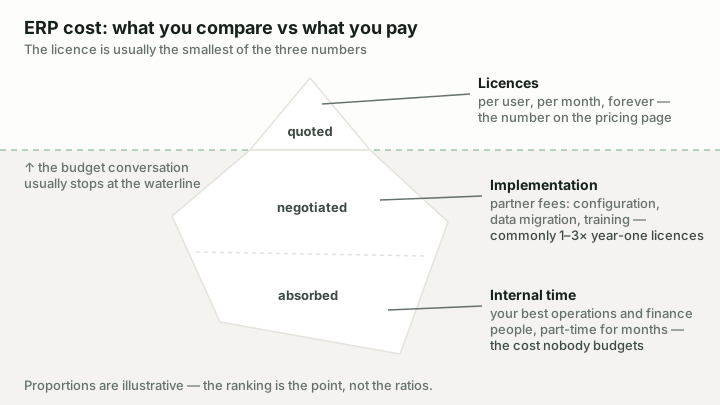
The licence is the visible tip. Implementation is negotiated once; internal time is absorbed quietly — and it is usually the biggest number.
This framing changes decisions. A "free" ERP is not free once implementation and operations are counted — though it may still be the cheapest. An expensive ERP implemented badly is the worst of all worlds. And the difference between a good and bad implementation partner routinely outweighs the difference between the software products themselves.
The three-way landscape
For SMEs weighing a real ERP, three systems come up constantly — and they represent three genuinely different philosophies.
The Microsoft ERP sized — and priced — for small and mid-sized businesses
Best for: Small and mid-sized businesses already in the Microsoft ecosystem that have outgrown accounting software and want a real ERP without enterprise implementation weight.
Business Central is the packaged SME answer. A strong finance core descended from Navision, inventory and manufacturing on the Premium tier, everyday Microsoft 365 integration, and the largest partner network in SME ERP. At $80–110 per user per month (verified August 2026) it costs meaningfully more than accounting software — because it does a meaningfully bigger job. For a business already living in Microsoft 365, it is the default we test first.
The open-source ERP whose free tier is the entire product
Best for: Cost-conscious SMEs with in-house technical capability — or a good implementation partner — that want full ERP breadth without per-user licence costs.
ERPNext is the open-source answer, and the one we know most intimately — we implement and operate it ourselves, including an education-sector deployment. The entire product is free under the GPL: accounting, inventory, manufacturing, CRM, projects, HR via Frappe HR. The money you save on licences moves to implementation and operations, which is where it always mattered anyway. It rewards businesses with technical capability and punishes casual adoption.
Microsoft’s enterprise ERP for complex, multi-entity organisations
Best for: Large and multi-entity organisations — typically 200+ employees with dedicated IT — that need enterprise-grade financials, supply chain depth and global localisation.
Dynamics 365 Finance & Operations is the enterprise answer, and for most readers of this article the honest advice is: not yet. Its multi-entity depth, localisation coverage and supply chain capability are real — and priced and weighted for organisations with dedicated IT and six-figure implementation budgets. It appears here mainly so you can recognise when a partner is over-scoping you into it.
The full criterion-by-criterion comparison, generated live from our product profiles:
Comparison
Business Central vs ERPNext vs Dynamics 365 F&O: Which ERP Fits Your Business?Three very different answers to the same question — a Microsoft SME ERP, an open-source suite, and an enterprise platform — compared honestly.
Choosing an implementation partner
For Business Central and F&O a partner is effectively mandatory; for ERPNext it is optional but often wise. Selection advice from the projects we have seen succeed and fail:
- Buy industry experience, not certifications. A partner who has implemented for your kind of business — distribution, manufacturing, services — has already made your mistakes on someone else's project.
- Insist on named people. The partner's A-team sells the project; ask who actually staffs it, and meet them before signing.
- Prefer fixed-scope phases to open-ended time-and-materials. A phased contract — core finance first, operations second — keeps everyone honest and gives you exit ramps.
- Check the aftercare. Ask existing customers what support was like in month six, not month one. ERP relationships are long; you are choosing a partner, not a project.
Implementation is where ERP projects fail
The uncomfortable truth of this category: ERP failures are rarely software failures. The recurring causes we see are unowned decisions (nobody senior enough owns the chart-of-accounts redesign or the inventory-costing choice), dirty data migrated on hope, scope that grows mid-flight, and training treated as an afterthought. The fixes are unglamorous — a named internal owner with real authority, data cleaned before migration, a phase-one scope you can hold, and go-live support budgeted from the start.
Pick the system that fits your scale and capability, then spend your anxiety on the implementation. That is where the money is won or lost.
Sources & further reading
- Business Central pricing — primary source for all BC pricing claims
- Microsoft Dynamics 365 Licensing Guide — attach licences and Team Members rights
- ERPNext documentation — capability claims for the open-source option