
The fastest revenue win in most small businesses is embarrassingly simple: answer enquiries faster. Leads decay by the hour, yet enquiries routinely sit overnight because they arrived in the wrong inbox. This tutorial builds the fix — an automated intake pipeline that gets every enquiry classified, routed and acknowledged within minutes, without ever letting a robot improvise at a customer.
The design in one picture
Every channel feeds one flow: capture → normalise → AI triage → route → acknowledge → task. One flow, not five — per-channel automations drift apart within months.
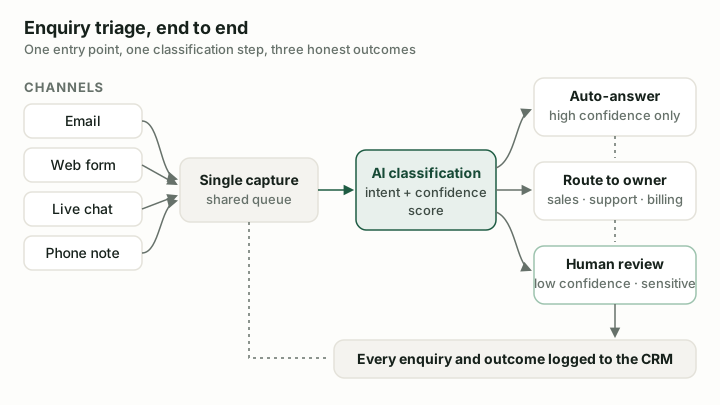
The whole design in one picture: one capture point, one classification step, three honest outcomes — and the CRM records all of it.
Step 1: Capture every channel into one entry point
Create a Make scenario with a webhook trigger as the single entry point, then feed it from each channel: your website form posts to the webhook directly; the shared inbox (enquiries@) connects via the email module; portal or marketplace leads arrive as parsed emails. Normalise everything to the same shape — source, name, contact, raw message, timestamp. Twenty minutes of mapping here saves hours of duplicated logic later.
Step 2: Triage with AI — with a confidence rule
Add an AI module with a strict prompt: classify the enquiry (new-business / existing-customer / supplier / spam), extract name, company, contact details and the request in one sentence, and return structured JSON only, including a confidence score. Two rules make this production-grade rather than a demo:
- Validate the output. Parse the JSON and check required fields; malformed output goes down the error route, not into your CRM.
- Respect the confidence threshold. Below your threshold (we start at 0.7), the enquiry routes to a human triage queue instead of being guessed at. Expect 5–15% of volume there initially; review it weekly and tighten the prompt.
Step 3: Route with a router
Make's router splits the flow: new business creates a CRM person and deal with the AI's extraction pasted into the notes — in Pipedrive, deal plus immediate follow-up activity; in HubSpot, contact plus deal plus task — assigned by your rules (round-robin, territory). Existing customers go to the helpdesk or account owner with a same-day task. Suppliers and spam are quietly filed. Every branch posts a notification with the one-sentence summary so the owner has context before opening anything.
Step 4: Acknowledge — neutrally
Send an automatic acknowledgement: received, human will respond within X hours, whom to call if urgent. Send it from a monitored address and do not let the AI compose it — a fixed template with the recipient's name inserted. The acknowledgement buys your team response time honestly; an AI improvising promises does the opposite.
Step 5: Build the error route
Attach an error handler to every fallible module: on failure, write the raw enquiry to a fallback sheet and alert a named person. The worst outcome of this whole build is an enquiry silently vanishing — the error route is what makes automation trustworthy enough to leave running. Test it by making a module fail on purpose; if nobody gets alerted, it is not done.
Step 6: Measure the only number that matters
Record time-to-first-human-response for two weeks before launch, then after. Typical result: hours become minutes for the same headcount, and the follow-up task means fewer enquiries fall through entirely. That delta is the business case for every further automation you build.
What deliberately stays human
Substantive replies, quotes, anything where the customer would feel deceived to learn a machine wrote it. The system's job is to make the human fast and informed — extraction in the CRM notes, context in the notification — not to replace the conversation.
Full hands-on testing of AI classification accuracy across providers is in progress; the design above assumes imperfect classification and is safe under it — that is the point of the confidence threshold and error routes.
Sources & further reading
- Harvard Business Review — The Short Life of Online Sales Leads — the classic study on response-time decay
- Make error handling documentation — reference for the error route in Step 5