
ERPNext is the rare ERP you can genuinely install yourself in an afternoon — the entire product, free, on a modest server. This guide is the current official route, verified against the Frappe repositories in August 2026, because most ERPNext tutorials on the internet describe methods that no longer exist. Two things changed recently that older guides miss: the recommended production path is the easy-install script, which now lives in the frappe/bench repository (not frappe_docker, where older articles point), and the quick-demo compose file is explicitly not for production.
Prerequisites (the honest version)
- A fresh Ubuntu 22.04 or 24.04 server — a VPS from any provider works. Do not install on a server already running other websites unless you know how to handle port conflicts (see failures section).
- RAM: 2GB is the floor, 4GB is comfortable. ERPNext will install on 2GB and then remind you of it at every upgrade; the price difference to 4GB is small enough that we recommend paying it.
- A domain or subdomain (e.g.
erp.yourcompany.com) with an A record pointing at the server's IP before you start — the script issues a free HTTPS certificate during install, and that fails if DNS is not ready. - Ports 80 and 443 free and open in your provider's firewall, plus SSH access as root or a sudo user.
Route 1: Ten-minute evaluation (not production)
If you only want to see ERPNext before committing, the official demo compose file is the fastest route:
git clone https://github.com/frappe/frappe_docker
cd frappe_docker
docker compose -f pwd.yml up -d
Wait a few minutes for the containers to settle, then open port 8080 on the server and log in as Administrator with password admin. Two warnings, straight from the README: this setup is for short-lived evaluation only, and you cannot install custom apps into it. Do not talk yourself into running a business on it.
Route 2: Production install with the easy-install script
This is the current official path for a single-server production deployment — it installs Docker if missing, clones frappe_docker for you, and deploys a full compose project: ERPNext, MariaDB, Redis, an HTTPS proxy with a Let's Encrypt certificate, and a scheduled backup container.
wget https://raw.githubusercontent.com/frappe/bench/develop/easy-install.py
python3 easy-install.py deploy \
  --project=erp \
  --email=you@yourcompany.com \
  --sitename=erp.yourcompany.com \
  --app=erpnext
The flags that matter: --email is required (it registers the SSL certificate), --sitename must match the DNS record you created, --app=erpnext installs ERPNext on top of the Frappe framework, and --project names the Docker compose project (keep it short — it prefixes every container). Useful extras: --version pins an ERPNext version rather than latest stable, --no-ssl skips HTTPS for an internal-network install, and --backup-schedule changes the backup cron from its default of every six hours.
The script runs for several minutes. When it finishes, it writes two files to your home directory that you must save somewhere safe immediately: ~/erp-passwords.txt (the Administrator and database passwords) and ~/erp.env (the deployment configuration). Check everything is up with:
docker compose -p erp ps
Every container should show as running or healthy. Then open https://erp.yourcompany.com and log in as Administrator with the password from the passwords file.
The setup wizard, briefly
First login starts a one-time wizard. Three of its answers are hard to change later, so decide them before clicking: country (it drives the chart of accounts, currency and tax templates), chart of accounts (accept the standard one for your country unless your accountant says otherwise), and fiscal year dates. Company name and abbreviation follow — the abbreviation prefixes every account and warehouse, so keep it to three or four letters. Everything else in the wizard is comfortably changeable afterwards.
What self-hosting actually costs you
This is the section most tutorials skip. The licence is free; the responsibility is not — this is the same trade we describe in our ERP selection guide, and it is why our three-way ERP comparison does not simply declare the free option the winner.
Updates. Minor updates are the same script with a different verb: python3 easy-install.py upgrade -n erp pulls current images and restarts the stack. Major version upgrades deserve respect: read the release notes, take a manual backup first, and if the system matters to your business, test the upgrade on a copy before touching production.
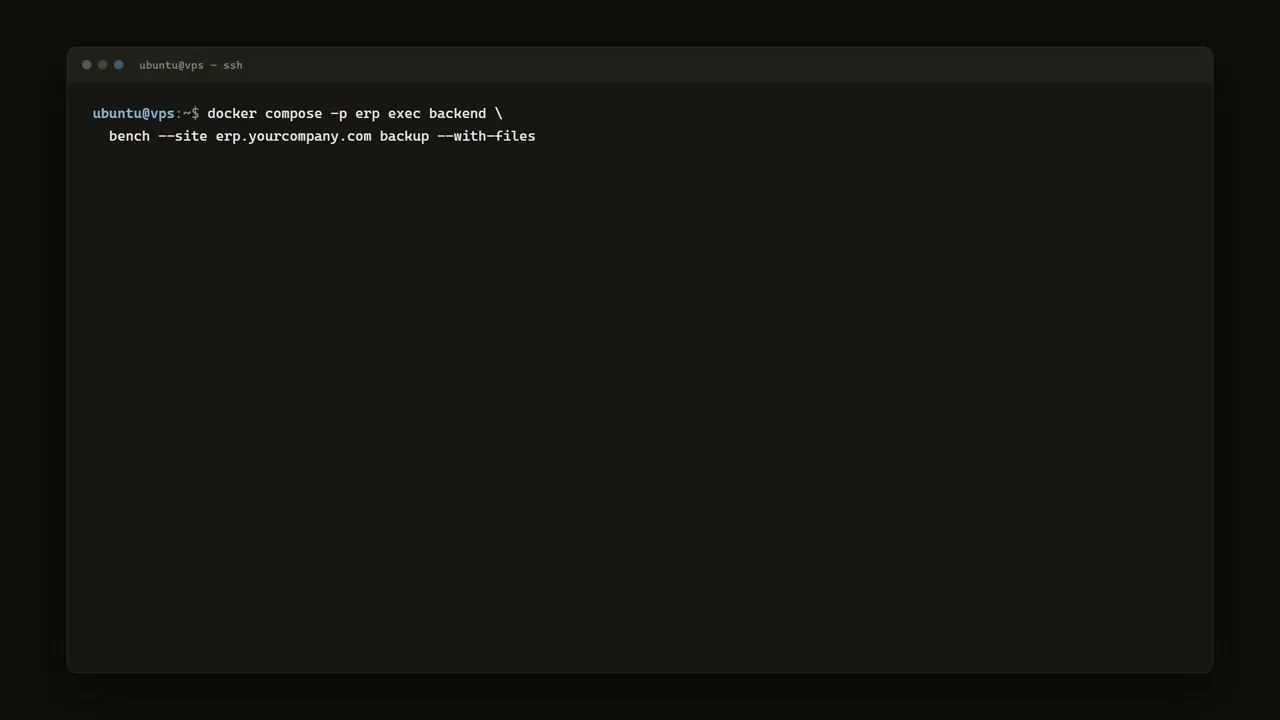
Backups. The deploy sets up automatic backups every six hours, but automatic backups on the same server are half a backup. Take a manual one before anything risky:
docker compose -p erp exec backend \
  bench --site erp.yourcompany.com backup --with-files
Then copy the backup files off the server on a schedule — object storage or even a nightly rsync to another machine. A backup you have never restored is a hope, not a backup: rehearse a restore once.
The alternative that removes all of this. Frappe Cloud — the vendor's own hosting — runs the same product with site plans from $5/month (verified Aug 2026), and updates, backups and monitoring are their problem. Our honest rule from running ERPNext ourselves: self-host when you have a person who will genuinely own the ops (or when data-residency demands it); buy Frappe Cloud when you do not. The $5–50/month is cheaper than the first weekend you lose to a failed upgrade.
Common install failures and fixes
- Port already allocated (80/443/8080): something else — often an existing nginx or Apache — owns the port. Stop it, or put ERPNext on a clean server. For the demo route, change the published port in
pwd.yml. - MariaDB container unhealthy / site creation hangs: the database was not ready when site creation started — commonest on 1–2GB servers. Check
docker compose -p erp logs db; if it is memory pressure, upgrade the VPS. Re-running the deploy after fixing the cause is safe. - SSL certificate fails to issue: DNS is not pointing at the server yet, or port 80 is blocked. Fix the A record, wait for propagation, re-run.
- ARM servers (Ampere VPS, Apple Silicon for local tests): image availability on ARM has historically been patchy; if containers crash-loop on ARM, force
linux/amd64platform (slow, emulated) or use an x86 server. Cheap x86 VPSes remove the whole problem.
Where this fits in your ERP decision
An afternoon's install is not an implementation — chart of accounts, opening balances, stock, permissions and training are where the real project lives, self-hosted or not.
The open-source ERP whose free tier is the entire product
Best for: Cost-conscious SMEs with in-house technical capability — or a good implementation partner — that want full ERP breadth without per-user licence costs.
If you are still deciding whether ERPNext, Business Central or something bigger fits your business — or you want an honest view before committing implementation weeks — that assessment is exactly what we do.
Sources & further reading
- frappe/frappe_docker — official Docker repository; pwd.yml demo route and production docs (accessed 21 Aug 2026)
- frappe/bench — Easy Install — the easy-install script's current home and usage (accessed 21 Aug 2026)
- ERPNext documentation — setup wizard and post-install configuration
- Frappe Cloud pricing — the managed alternative, site plans from $5/mo (accessed Aug 2026)